
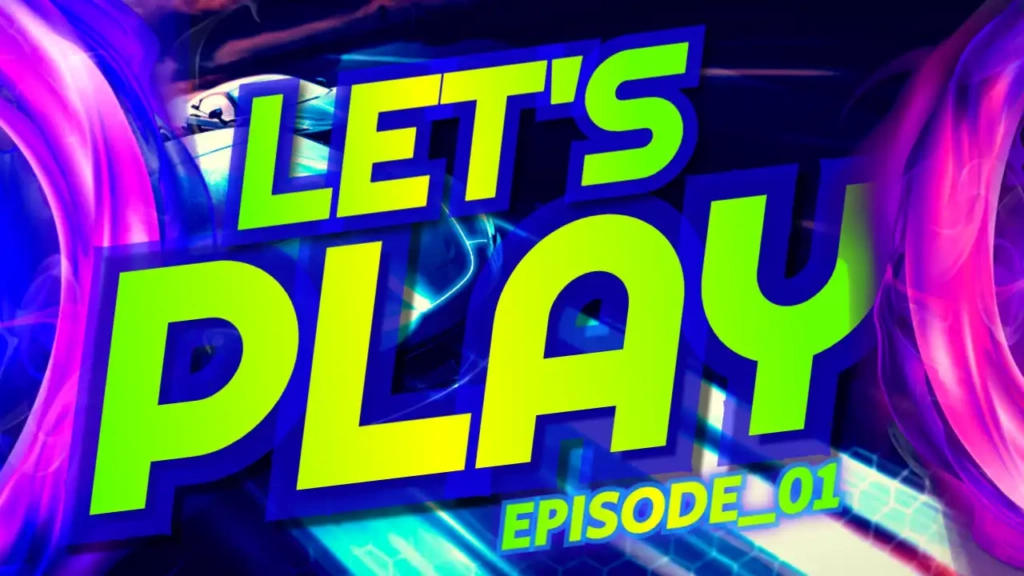
Why “Let’s Play” Thumbnails Matter
“Let’s Play” videos are everywhere on YouTube. From indie games to AAA titles, thousands of creators upload gameplay content daily. Without an eye-catching thumbnail, your video can easily get lost among competitors.
A strong thumbnail:
- Attracts viewers instantly
- Increases click-through rate (CTR)
- Shows the tone and style of your content
- Builds your personal brand
The “Let’s Play” template is designed to do all of this with a fun, energetic, and colorful look.
Bright and Playful Design
This template stands out with its bold and vibrant color combination:
- Blue adds a calm and modern touch
- Pink creates excitement and visual interest
- Yellow grabs attention and highlights key elements
Together, these colors create a playful and engaging design that is perfect for gaming content.
The Sport and Fitness-style font adds a sense of energy and movement, making your thumbnail feel dynamic and exciting—exactly what viewers expect from a “Let’s Play” video.
Key Features of the Template
The “Let’s Play” YouTube thumbnail template is designed with both performance and simplicity in mind.
Eye-Catching Title Text
The “Let’s Play” text is bold and easy to read, ensuring your message is clear even on small screens.
Vibrant Color Scheme
The bright color palette helps your thumbnail stand out in search results and recommended feeds.
Clean Layout
The design keeps things simple, focusing on the main message without unnecessary clutter.
Fully Customizable
You can easily edit text, colors, and images to match your specific content.
Perfect for Gaming Content
Designed specifically for gameplay videos, walkthroughs, and reactions.
Benefits of Using This Template
Save Time
Instead of designing from scratch, you can create a professional thumbnail in minutes.
Beginner-Friendly
No design experience is needed. The template is simple and easy to use.
Boost Clicks and Views
The bright colors and bold text are optimized to attract attention and increase engagement.
Mobile Optimization
Your thumbnail will look great on all devices, especially smartphones.
Consistent Branding
Using a consistent style helps viewers recognize your videos instantly.
How to Edit the Template
Editing your “Let’s Play” thumbnail is quick and straightforward:
- Open the template link provided above
- Click on the edit option
- Replace the text with your video title or episode name
- Add your gameplay screenshot or character image
- Adjust colors or elements if needed
- Download your finished thumbnail
Within minutes, your thumbnail is ready to upload to YouTube.
Pro Tips for Better “Let’s Play” Thumbnails
To maximize your results, follow these tips:
Use Expressive Screenshots
Choose moments that show emotion, action, or excitement.
Add Short Text
Use phrases like “Episode 1,” “Funny Moments,” or “Boss Fight.”
Highlight Characters
Featuring game characters can attract fans of that game.
Keep It Clean
Avoid overcrowding your thumbnail with too many elements.
Stay Consistent
Use similar styles across your thumbnails to build a recognizable brand.
Who Should Use This Template?
This template is perfect for:
- Gaming YouTubers
- Streamers uploading highlights
- Beginners starting a channel
- Content creators making walkthroughs
- Anyone creating “Let’s Play” videos
No matter what type of game you play, this template helps your content stand out.
SEO Benefits of High-Quality Thumbnails
While titles and descriptions are important for SEO, thumbnails also play a key role. A higher click-through rate signals to YouTube that your content is engaging.
This can lead to:
- Better rankings
- More impressions
- Increased watch time
- Faster channel growth
The “Let’s Play” template is designed to improve CTR and boost your video performance.
Free Download and Easy Access
One of the best things about this template is that it’s completely free. You don’t need expensive software or advanced skills to create high-quality thumbnails.
Simply open the template link, customize it to your needs, and download it instantly. It’s fast, easy, and perfect for creators who want professional results.