
Why Thumbnails Matter for PUBG Mobile Montages
Montage videos are all about excitement, skill, and fast-paced action. But on YouTube, viewers decide what to watch in just seconds. Your thumbnail needs to stand out and communicate intensity immediately.
A strong thumbnail helps:
- Increase click-through rate (CTR)
- Showcase action and skill
- Build your gaming identity
- Attract PUBG Mobile fans
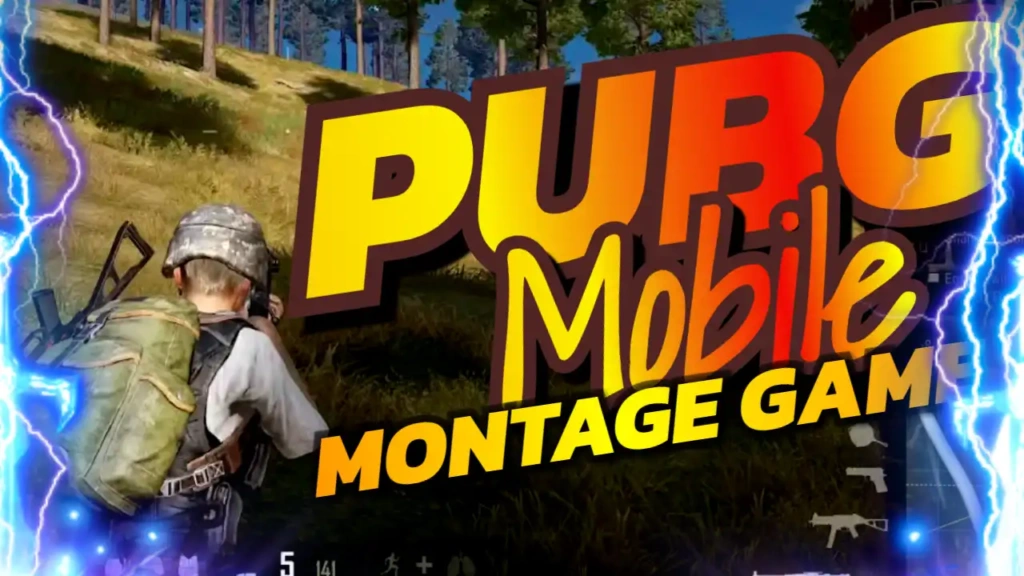
The “PUBG MOBILE MONTAGE GAME” template is designed specifically to highlight these elements and make your video irresistible to click.
High-Energy Color Combination
This template uses a vibrant and energetic color palette:
- Yellow grabs attention instantly
- Red represents action, danger, and excitement
- Blue adds balance and a modern touch
These colors work together to create a visually striking thumbnail that stands out in both search results and recommended videos.
The Sport and Fitness-style font enhances the sense of speed and movement, making your thumbnail feel dynamic and competitive.
Key Features of the Template
The “PUBG MOBILE MONTAGE GAME” thumbnail template is built for performance and ease of use.
Bold Title Text
The large and clear text ensures viewers instantly understand your video content.
Strong Visual Contrast
The combination of bright and bold colors ensures visibility on all devices.
Clean Layout
The design keeps the focus on gameplay visuals and key text.
Fully Customizable
You can easily edit text, colors, and images to match your style.
Perfect for Montage Videos
Optimized for fast-paced, action-packed gaming content.
Benefits of Using This Template
Save Time
Create professional thumbnails in minutes without starting from scratch.
Easy to Use
No design experience is needed. Simply edit and download.
Boost Engagement
The bold design helps attract more clicks and increase views.
Mobile-Friendly
Your thumbnail will look sharp on smartphones and tablets.
Build a Recognizable Brand
Consistent thumbnails help viewers identify your content instantly.
How to Edit the Template
Editing your “PUBG MOBILE MONTAGE GAME” thumbnail is simple:
- Open the template link provided above
- Click on the edit option
- Replace the text with your video title (e.g., “Insane Sniper Montage”)
- Add gameplay screenshots or character images
- Adjust colors or effects if needed
- Download your finished thumbnail
Within minutes, your thumbnail is ready to upload to YouTube.
Pro Tips for PUBG Mobile Thumbnails
To maximize your results, follow these expert tips:
Use Action Shots
Choose moments with kills, explosions, or intense fights.
Highlight Weapons or Characters
Show popular guns or skins to attract fans.
Keep Text Short and Powerful
Examples: “1v4 Clutch,” “Insane Kills,” “Best Montage.”
Add Effects
Motion blur, glow, or fire effects can enhance the action feel.
Stay Consistent
Use a similar style across all your thumbnails to build your brand.
Who Should Use This Template?
The “PUBG MOBILE MONTAGE GAME” template is perfect for:
- PUBG Mobile YouTubers
- Gaming content creators
- Streamers sharing highlights
- Montage editors
- Beginners growing a gaming channel
Whether you’re creating daily content or cinematic edits, this template helps your videos stand out.
SEO Benefits of High-Quality Thumbnails
Many creators focus only on keywords and descriptions, but thumbnails also play a major role in video performance. A high CTR tells YouTube that your content is engaging.
This can lead to:
- Higher rankings in search results
- More impressions
- Increased watch time
- Faster channel growth
Using a strong template like “PUBG MOBILE MONTAGE GAME” can significantly improve your visibility.
Free Download and Easy Access
One of the biggest advantages of this template is that it’s completely free. You don’t need expensive software or advanced design skills.
Simply open the template link, customize it, and download your thumbnail instantly. It’s fast, easy, and perfect for creators who want professional results.