
Why Live Stream Thumbnails Matter
Unlike regular video uploads, live streams require immediate attention. Viewers are deciding in real-time whether to join your stream or scroll past it.
A powerful live stream thumbnail can:
- Attract viewers instantly
- Communicate that you are LIVE
- Increase your stream’s visibility
- Build excitement and urgency
- Boost overall engagement
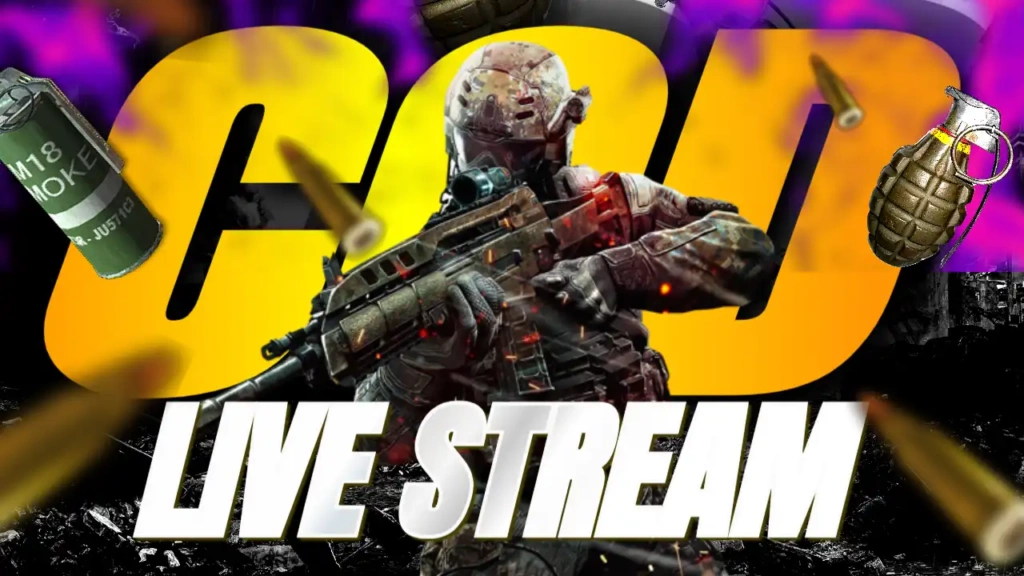
For a competitive game like Call of Duty, your thumbnail should reflect action, skill, and intensity—and that’s exactly what this template delivers.
Features of the COD Live Stream Thumbnail Template
This template is designed to maximize visibility and impact for live gaming content.
1. High-Energy Color Combination
The use of yellow, blue, white, and black creates a dynamic and eye-catching design:
- Yellow highlights important elements and grabs attention
- Blue adds a modern gaming feel
- White ensures text clarity
- Black adds depth and contrast
This combination makes your thumbnail stand out in both light and dark mode on YouTube.
2. Sport & Fitness Style Font
The Sport And Fitness font adds a competitive and action-packed feel to your thumbnail. It’s bold, clean, and easy to read, even on small screens.
This font style is perfect for:
- FPS games
- eSports content
- Live streams
- Competitive gameplay
3. Live Stream Focused Layout
The layout is optimized for live streaming, allowing you to highlight:
- The player or character
- Action-packed gameplay scenes
- “LIVE” or streaming indicators
- Bold headline text
This ensures viewers instantly recognize that your stream is happening now.
4. Clean Yet Powerful Design
The template balances bold visuals with a clean layout, ensuring your message is clear without overwhelming the viewer.
Who Should Use This Template?
This template is ideal for:
- Call of Duty streamers
- Warzone content creators
- FPS gamers
- YouTube live streamers
- eSports players
- Gaming content creators
If your content revolves around live gameplay and competitive action, this template is a perfect fit.
How to Customize the Template
You can easily customize this template in just a few simple steps:
Step 1: Open the Template
Use the link below to access the template in the editor.
Step 2: Add Your Gameplay Image
Upload a high-quality screenshot or action shot from your gameplay. For best results:
- Choose intense moments
- Show weapons or combat scenes
- Use clear and sharp images
Step 3: Edit the Text
Customize the text to match your stream. Examples include:
- “LIVE NOW”
- “COD Live Stream”
- “Warzone Live”
- “Ranked Gameplay Live”
Keep the text short, bold, and easy to read.
Step 4: Adjust Colors if Needed
You can tweak the colors slightly to match your branding, but the default palette is already optimized.
Step 5: Download and Use
Download your thumbnail in high resolution and upload it to your YouTube live stream.
Tips for Creating Engaging Live Stream Thumbnails
To get the best results, follow these expert tips:
Use Real-Time Energy
Choose images that show action and intensity to reflect the live nature of your stream.
Add a “LIVE” Indicator
This creates urgency and encourages viewers to join immediately.
Keep It Simple
Avoid clutter. Focus on one strong message.
Highlight Your Character or Weapon
Make sure the main subject is clearly visible.
Use Bright Highlights
Bright colors and contrast help your thumbnail stand out in the feed.
Benefits of Using ThumbzStudio Templates
ThumbzStudio makes thumbnail creation fast and hassle-free.
Here’s why creators love it:
- Easy to use for beginners
- No design experience required
- Professional-quality templates
- Quick customization
- Completely free
You can create high-quality thumbnails in minutes without any technical skills.
Grow Your Live Streaming Audience
A great thumbnail can significantly impact your live stream performance. It helps attract more viewers and keeps your stream competitive.
The “COD Call of Duty Live Stream” template helps you:
- Stand out among live streams
- Attract more viewers instantly
- Build a strong gaming brand
- Increase engagement and watch time
If you want to grow your streaming channel, investing in strong visuals is essential.
Free Download – Start Streaming Now
Ready to create a powerful live stream thumbnail?
👉 Use the template here:
https://www.thumbzstudio.com/template/f75729b0-2a81-43c3-a37b-e0bbc831c418
Customize it easily and download your thumbnail for free.