
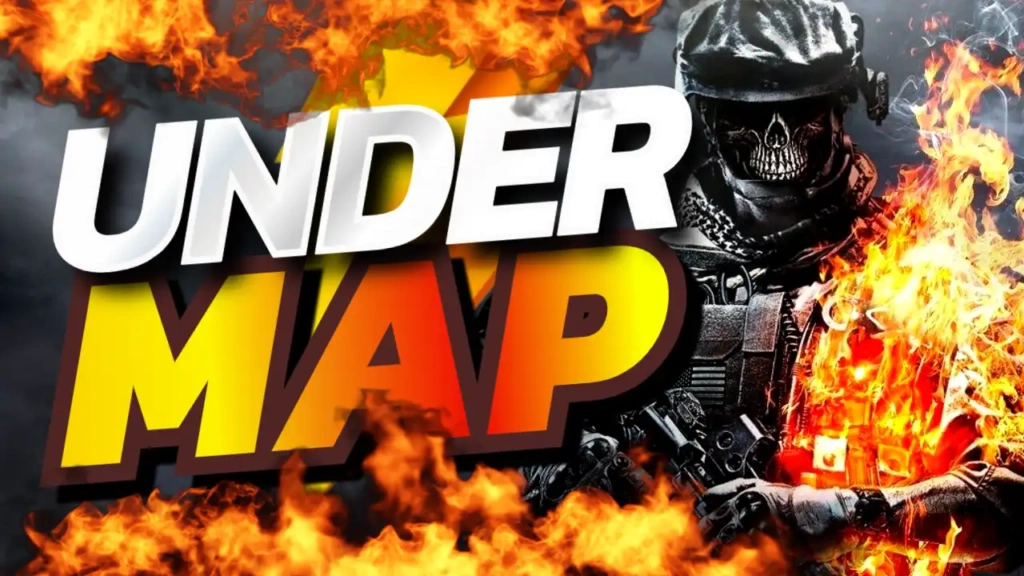
Why “Under Map” Content Goes Viral
Gaming audiences are naturally curious. They love discovering things that are hidden, unexpected, or even slightly “forbidden.” Content that explores glitches or secret areas often performs well because it offers something different from standard gameplay.
“Under Map” content works because it:
- Creates instant curiosity
- Feels exclusive or rare
- Shows unusual gameplay experiences
- Encourages viewers to learn or try it themselves
When paired with a strong thumbnail, this type of content can easily stand out and go viral.
Overview of the Template Design
The Under Map thumbnail template is built to highlight mystery and intensity. The white, yellow, red, and black color palette creates strong contrast and ensures your thumbnail stands out in busy YouTube feeds.
Key Features:
- High-contrast white, yellow, red, black color scheme
- Bold Sport and Fitness font style for strong visibility
- Clean layout that highlights key elements
- Fully customizable for any game or glitch content
- Designed to increase click-through rate (CTR)
Color Psychology for Mystery and Action
Each color in this template plays an important role in capturing attention:
- White – Keeps text clear and readable
- Yellow – Grabs attention and signals something important
- Red – Adds intensity and urgency
- Black – Creates a dark, mysterious atmosphere
This combination is perfect for thumbnails that aim to spark curiosity and excitement.
Typography That Demands Attention
The Sport and Fitness font style used in this template is bold and impactful. It ensures that the text “Under Map” stands out clearly, even on smaller screens.
Strong typography is essential for glitch-related content because it helps viewers instantly understand the concept of the video.
Best Content Ideas for This Template
The “Under Map” template is ideal for:
- Glitch exploration videos
- Hidden map discoveries
- Secret locations in games
- Out-of-bounds gameplay
- Bug and exploit showcases
This template works especially well for popular games where players are constantly searching for secrets.
How to Use the Template
Creating your thumbnail is simple and fast:
Step 1: Open the Template
Access it here:
https://www.thumbzstudio.com/template/cbd2a809-bda7-4043-8860-942a93e8db63
Step 2: Customize Your Design
- Replace the text with your own variation (e.g., “Secret Glitch” or “Hidden Area”)
- Add your gameplay screenshot showing the glitch
- Adjust colors or effects if needed
Step 3: Download and Upload
Export your finished thumbnail and upload it to your YouTube video.
Pro Tips to Make Your Thumbnail Go Viral
To maximize your results, follow these expert strategies:
1. Show the Glitch Clearly
Use a screenshot that clearly shows you under the map or inside a hidden area.
2. Use Arrows and Highlights
Guide the viewer’s attention with arrows, circles, or glow effects.
3. Keep Text Short
Simple phrases like “Under Map!” or “Secret Glitch” work best.
4. Add Contrast
Make sure your subject stands out from the background.
5. Create Curiosity
Don’t reveal everything—leave some mystery to encourage clicks.
Benefits of Using Free Thumbnail Templates
Templates like this one make it easier to create professional thumbnails quickly:
- No design experience required
- Saves time and effort
- High-quality results
- Easy customization
- Consistent branding
This allows you to focus more on discovering and creating unique content.
Why Choose ThumbzStudio?
ThumbzStudio offers a wide range of YouTube thumbnail templates tailored for different niches, including gaming, tech, and lifestyle. Each template is designed to maximize engagement and help creators grow their channels.
The “Under Map” template is perfect for creators who want to showcase unique gameplay moments and stand out from the crowd.