
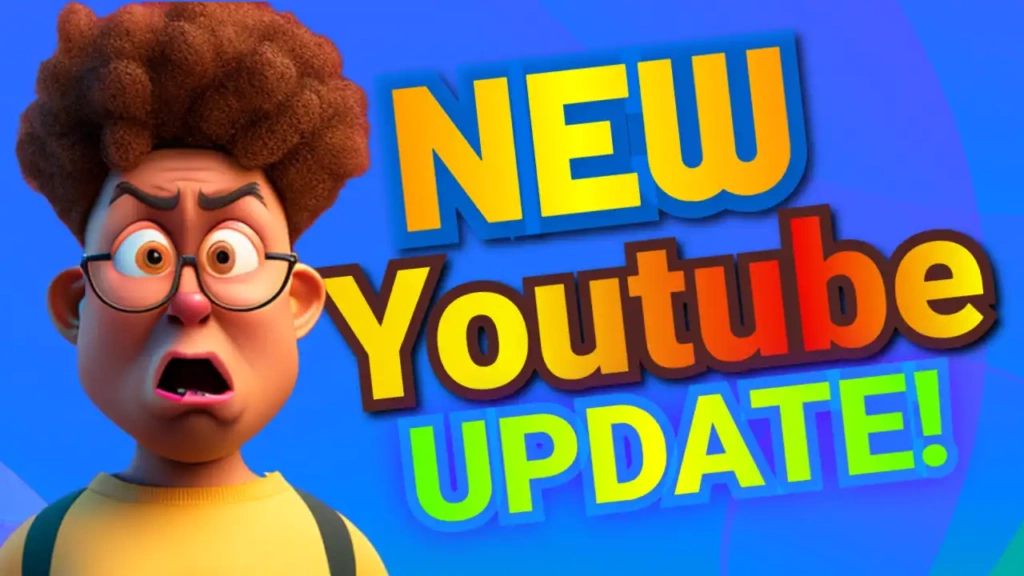
Why Update Thumbnails Matter on YouTube
People love staying informed about the newest changes, features, and releases. Whenever a major update happens, viewers rush to YouTube looking for explanations, reactions, and tutorials.
A powerful thumbnail helps:
- Increase click-through rate (CTR)
- Create urgency and curiosity
- Make your video look professional
- Improve viewer engagement
The “New Update” template is designed specifically to highlight fresh content and make viewers feel like they need to watch your video immediately.
Bold and Modern Color Combination
This template uses a strong and modern color palette:
- Yellow grabs attention instantly
- Blue creates trust and professionalism
- Black adds depth and contrast
Together, these colors create a clean yet energetic visual style that works perfectly for update-related content.
The marketing-style font gives the thumbnail a modern business-like appearance, helping your content look polished and high-quality.
Key Features of the Template
The “New Update” YouTube thumbnail template is built for creators who want fast, effective, and professional results.
Bold and Readable Text
The title is large and clear, making it easy to read even on mobile devices.
High-Contrast Design
Bright yellow highlights combined with dark backgrounds make important elements stand out.
Clean Layout
The design focuses on the message without unnecessary clutter.
Fully Editable
You can customize the text, colors, and visuals to match your content.
Multi-Purpose Style
Perfect for gaming, apps, tech, finance, software, and trending updates.
Benefits of Using This Template
Save Time
No need to design thumbnails from scratch. This template allows you to create professional thumbnails in minutes.
Beginner-Friendly
You don’t need advanced design skills to edit this template.
Increase Views and Engagement
Bold visuals and strong text help attract more clicks.
Mobile Optimized
The thumbnail remains clear and effective on smartphones and tablets.
Build Channel Consistency
Using similar thumbnail styles helps strengthen your branding.
How to Edit the Template
Editing your “New Update” thumbnail is fast and simple:
- Open the template link provided above
- Click on the edit option
- Replace the text with your update title
- Add screenshots, icons, or related visuals
- Adjust colors or effects if needed
- Download your finished thumbnail
Within a few minutes, your thumbnail is ready to upload.
Pro Tips for Update Thumbnails
To maximize your thumbnail performance, follow these tips:
Use Urgent Words
Phrases like “NEW,” “LATEST,” “UPDATE,” or “JUST RELEASED” increase curiosity.
Add Visual Indicators
Arrows, circles, and highlights help focus viewer attention.
Keep Text Short
Short headlines are easier to read and more effective.
Use Relevant Screenshots
Include visuals from the game, app, or update you are discussing.
Maintain Consistent Branding
Using the same style across videos helps viewers recognize your channel.
Who Should Use This Template?
The “New Update” template is perfect for:
- Gaming YouTubers
- Tech reviewers
- App tutorial creators
- Crypto and finance channels
- News and trending topic creators
No matter your niche, this template helps make your updates look professional and clickable.
SEO Benefits of High-Quality Thumbnails
Many creators focus only on titles and descriptions, but thumbnails also play a huge role in YouTube SEO. A high CTR signals to YouTube that viewers are interested in your content.
This can lead to:
- Higher rankings in search results
- More impressions
- Increased watch time
- Faster channel growth
Using a professional update-focused template like “New Update” can significantly improve your video performance.
Free Download and Easy Access
One of the biggest advantages of this template is that it’s completely free. You don’t need expensive software or advanced editing tools.
Simply open the template link, customize the design, and download your thumbnail instantly. It’s fast, easy, and designed for creators who want professional-quality results.