
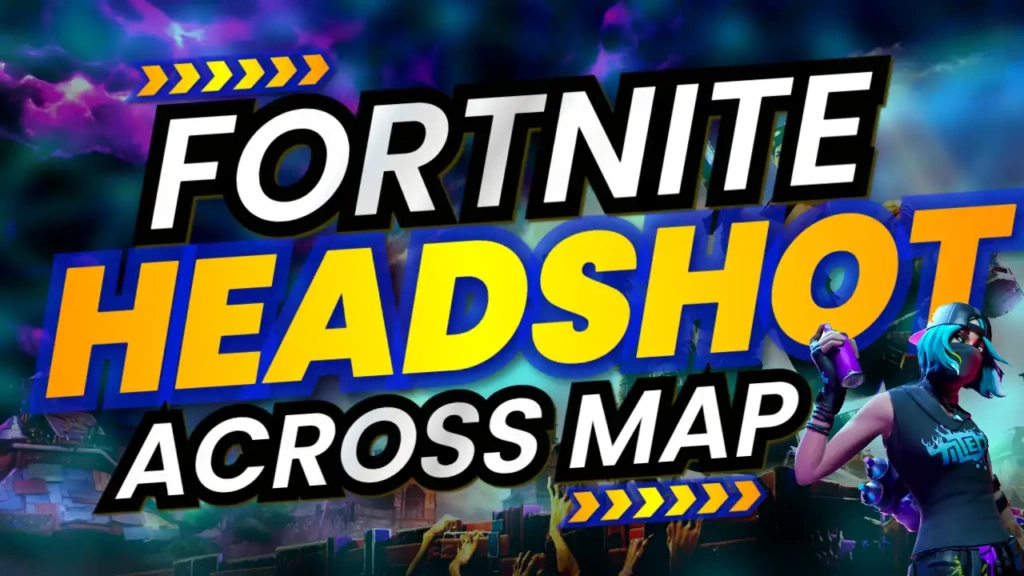
Why Fortnite Thumbnails Must Be Eye-Catching
Fortnite is a fast-paced, visually intense game. Your thumbnail needs to reflect that same energy. When viewers scroll through YouTube, they’re drawn to thumbnails that show action, excitement, and skill.
A powerful Fortnite thumbnail can:
- Increase your click-through rate (CTR)
- Highlight your best gameplay moments
- Build your gaming brand
- Attract competitive and casual players
The “Fortnite Headshot Across Map” template is built to deliver all of these benefits in one design.
Key Features of the Template
This template combines bold visuals with a clean and professional layout.
1. High-Impact Color Scheme
The use of blue, yellow, and black creates a strong visual contrast:
- Blue gives a cool gaming vibe
- Yellow highlights important elements
- Black adds depth and intensity
This combination ensures your thumbnail stands out on any device.
2. Sport & Fitness Style Font
The template uses a Sport and Fitness font, giving it a competitive and energetic feel. This is perfect for action-based gaming content like Fortnite.
3. Action-Focused Layout
The layout is designed to emphasize:
- The sniper or headshot moment
- The target or enemy
- Bold text placement
This helps viewers instantly understand the highlight of your video.
4. Clean Yet Dynamic Design
The design balances clarity and excitement. It avoids clutter while still delivering a high-energy look.
Who Should Use This Template?
This template is perfect for:
- Fortnite YouTubers
- Battle royale content creators
- Gaming highlight channels
- Streamers and clip creators
- eSports enthusiasts
- YouTube Shorts creators
If your content focuses on action, skill, and gameplay highlights, this template is ideal.
How to Customize the Template
Creating a professional thumbnail is easy with this template.
Step 1: Open the Template
Use the link below to access the template.
Step 2: Add Your Gameplay Image
Upload a high-quality screenshot showing your best moment. For example:
- A long-distance headshot
- A sniper kill
- A clutch win
Make sure the image is clear and exciting.
Step 3: Edit the Text
Customize the text to match your video. Examples:
- “Insane Headshot!”
- “Across Map Snipe”
- “Unbelievable Shot”
Keep the text short and powerful.
Step 4: Adjust Colors (Optional)
You can tweak the colors slightly to match your channel branding while keeping the overall theme.
Step 5: Download Your Thumbnail
Once finished, download your thumbnail in high resolution and upload it to YouTube.
Tips for Creating Viral Fortnite Thumbnails
To get the best results, follow these expert tips:
Highlight the Best Moment
Choose a frame that clearly shows action—like the exact moment of a headshot.
Use Zoom and Focus
Zoom in on the action to make it more visible on small screens.
Add Contrast
Make sure your subject stands out from the background.
Keep Text Minimal
Use 2–4 words that create curiosity and excitement.
Show Emotion or Impact
If possible, include reactions, explosions, or dramatic effects.
Benefits of Using ThumbzStudio Templates
ThumbzStudio helps creators save time while producing high-quality thumbnails.
Here’s why it’s a great choice:
- Easy to use for beginners
- No design skills required
- Fast editing and customization
- Professional-quality layouts
- Completely free
You can create eye-catching thumbnails in just a few minutes.
Grow Your Fortnite Channel Faster
In a competitive game like Fortnite, your thumbnail can make a huge difference. A strong design can attract more viewers and improve your video performance.
The “Fortnite Headshot Across Map” template helps you:
- Stand out in search results
- Attract gaming audiences
- Increase clicks and engagement
- Build a recognizable brand
If you want your Fortnite videos to perform better, this template is a powerful tool.