
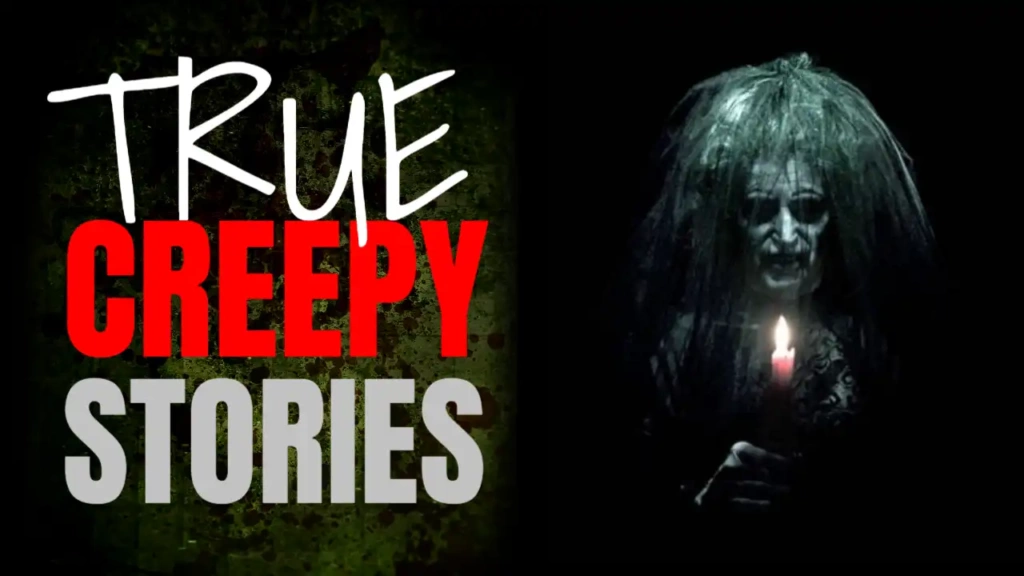
Why Red, White, and Green Work for Horror Thumbnails
Most horror thumbnails rely only on black and red. This template adds a creative twist by mixing red, white, and green—making your video visually unique while still maintaining a scary vibe.
🔴 Red – Fear and Danger
Red is essential for horror because it represents:
- Blood and danger
- Fear and tension
- Urgency and shock
- Emotional intensity
It instantly signals that the content is scary.
⚪ White – Mystery and Contrast
White adds:
- Clean contrast against darker visuals
- A ghostly or eerie feeling
- Better text readability
- Visual balance
White text pops strongly on YouTube feeds.
🟢 Green – Unnatural and Creepy Vibes
Green is often linked with:
- The supernatural
- Poison, sickness, or eerie environments
- Unnatural or unsettling emotions
When combined with red and white, green enhances the horror atmosphere in a subtle but powerful way.
What Is the Horror Stories YouTube Thumbnail Template?
The Horror Stories template is a professionally designed YouTube thumbnail for scary storytelling and lifestyle content. It blends fear with modern design, making it ideal for creators who want horror visuals that look clean, clickable, and professional.
This template is perfect for:
- Horror story narration
- Scary lifestyle podcasts
- Creepy short stories
- Paranormal and supernatural videos
- Horror voice-over channels
- Thriller and suspense content
With lifestyle fonts, the thumbnail remains readable and stylish while still delivering a creepy message.
Lifestyle Fonts That Fit Modern Horror Content
Fonts shape the personality of your thumbnail. This template uses clean lifestyle fonts that:
- Look modern and professional
- Are easy to read on mobile devices
- Balance fear with clarity
- Improve click-through rate
These fonts make your horror content accessible to a wider audience while maintaining suspense.
Key Features of the Horror Stories Thumbnail Template
✅ Unique Horror-Lifestyle Design
A fresh look that stands out from traditional horror thumbnails.
✅ Red, White, and Green Color Scheme
Eye-catching and emotionally powerful.
✅ Fully Customizable
Edit text, images, and layout easily.
✅ Beginner-Friendly Editor
No Photoshop or design skills required.
✅ YouTube-Optimized Dimensions
Perfect for desktop, tablet, and mobile.
✅ Edit or Free Download
Professional thumbnail at zero cost.
Best YouTube Niches for This Template
This template works exceptionally well for:
- Horror storytelling channels
- Paranormal and ghost stories
- Thriller lifestyle content
- Creepy podcasts on YouTube
- Mystery and suspense videos
- Horror shorts and series
If your content focuses on scaring, intriguing, or emotionally hooking viewers, this template is an excellent choice.
How This Thumbnail Helps Your Channel Grow
A strong thumbnail directly affects your YouTube success. This horror template helps you:
- Increase click-through rate (CTR)
- Create curiosity instantly
- Stand out in search results
- Build a consistent horror brand
- Attract loyal horror fans
Higher CTR tells YouTube’s algorithm that your video is engaging, leading to more recommendations.
How to Edit the Horror Stories Thumbnail Template
Editing is fast and simple using ThumbzStudio’s online editor.
Step 1: Open the Template
Go to:
https://www.thumbzstudio.com/template/41e5974a-aa64-45a4-9610-fca660f4757f
Step 2: Click “Edit Template”
The editor opens directly in your browser.
Step 3: Customize the Text
Effective horror phrases include:
- Horror Stories
- True Scary Stories
- Creepy Night Tales
- Real Horror Experience
- Don’t Watch Alone
Short and emotional text works best.
Step 4: Add Horror Visuals
Upload:
- Creepy faces or silhouettes
- Dark environments
- Ghostly characters
- Scary lifestyle imagery
Images enhance fear instantly.
Step 5: Adjust Colors (Optional)
Keep the red, white, and green palette or fine-tune shades to match your channel branding.
Step 6: Download and Upload
Download your finished thumbnail and upload it to YouTube.
Why ThumbzStudio Is Ideal for Horror Creators
ThumbzStudio makes thumbnail creation fast and stress-free.
ThumbzStudio Advantages
- Horror, lifestyle, marketing, and gaming templates
- Simple browser-based editor
- Free and premium options
- No design software needed
- Perfect for consistent uploads
It’s ideal for creators who want professional thumbnails without hiring designers.
SEO Tips for Horror YouTube Thumbnails
To maximize performance:
- Use emotional words like Horror, Scary, True, Creepy
- Match thumbnail text with your title
- Keep text minimal and bold
- Use expressive faces or dark visuals
- Focus on curiosity, not spoilers
This template already follows proven YouTube thumbnail best practices.
Edit or Free Download the Horror Stories Template
If you want a modern, eye-catching, and high-converting horror thumbnail, this design is a perfect fit.
👉 Edit or Free Download Here:
https://www.thumbzstudio.com/template/41e5974a-aa64-45a4-9610-fca660f4757f