
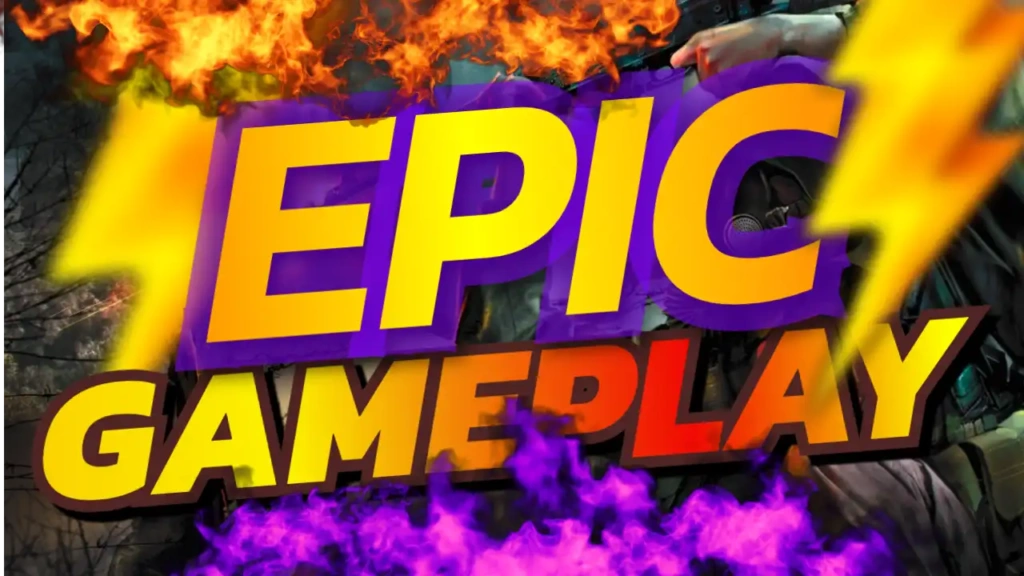
Why “Epic Gameplay” Content Performs So Well
Gaming audiences are always searching for exciting and unforgettable moments. Whether it’s a clutch win, insane skill play, or cinematic scene, “epic gameplay” promises high-quality entertainment.
This type of content attracts viewers because it:
- Highlights impressive skills
- Showcases intense action
- Creates excitement and curiosity
- Delivers entertaining moments
When paired with a strong thumbnail, your video becomes much more clickable and shareable.
Overview of the Template Design
The Epic Gameplay thumbnail template is built to emphasize action and clarity. The yellow, blue, black, and white color palette creates a vibrant and professional design that stands out in crowded YouTube feeds.
Key Features:
- Bold yellow, blue, black, white color combination
- Strong Sport and Fitness font style for high visibility
- Clean and structured layout
- Fully customizable for any gaming content
- Optimized for high click-through rate (CTR)
Color Psychology Behind the Design
Colors play a key role in attracting attention and influencing viewer behavior:
- Yellow – Grabs attention and adds energy
- Blue – Represents trust, focus, and control
- Black – Adds depth and a cinematic feel
- White – Ensures clarity and readability
This balanced combination helps your thumbnail stand out while maintaining a professional look.
Typography That Delivers Impact
The Sport and Fitness font style used in this template is bold, sharp, and dynamic. It reflects strength and action, making it perfect for gaming content.
Large, clear text ensures that “Epic Gameplay” is readable even on smaller screens, which is essential for mobile users.
Best Content Ideas for This Template
The “Epic Gameplay” template is highly versatile and works well for:
- Gaming highlights and montages
- Clutch moments and insane plays
- Competitive gameplay videos
- Boss fights and achievements
- Funny and unexpected moments
No matter your niche, this template helps you present your best moments in a professional way.
How to Use the Template
Creating your thumbnail is quick and simple:
Step 1: Open the Template
Access it here:
https://www.thumbzstudio.com/template/4b59cd52-8236-4b01-ad3f-1005096705b5
Step 2: Customize Your Design
- Replace the text with your video title
- Add your gameplay screenshot or character image
- Adjust colors or effects if needed
Step 3: Download and Upload
Export your thumbnail and upload it to your YouTube video.
Pro Tips to Increase Click-Through Rate
To maximize your results, follow these strategies:
1. Use High-Quality Screenshots
Choose sharp, detailed images that show action clearly.
2. Highlight Key Moments
Focus on the most exciting part of your gameplay.
3. Keep Text Short and Bold
Simple phrases like “EPIC!” or “INSANE PLAY” work best.
4. Add Visual Effects
Use glow, motion blur, or lighting to enhance the action.
5. Stay Consistent
Use a consistent style across your thumbnails to build your brand.
Benefits of Using Free Thumbnail Templates
Templates like this one make content creation faster and easier:
- No design experience required
- Saves time and effort
- Professional-quality results
- Easy customization
- Consistent branding
This allows you to focus more on creating engaging content.
Why Choose ThumbzStudio?
ThumbzStudio provides a wide range of high-quality YouTube thumbnail templates for creators across different niches. Each template is designed to help you increase visibility and engagement.
The “Epic Gameplay” template is perfect for gamers who want to showcase their best moments and attract more viewers.