
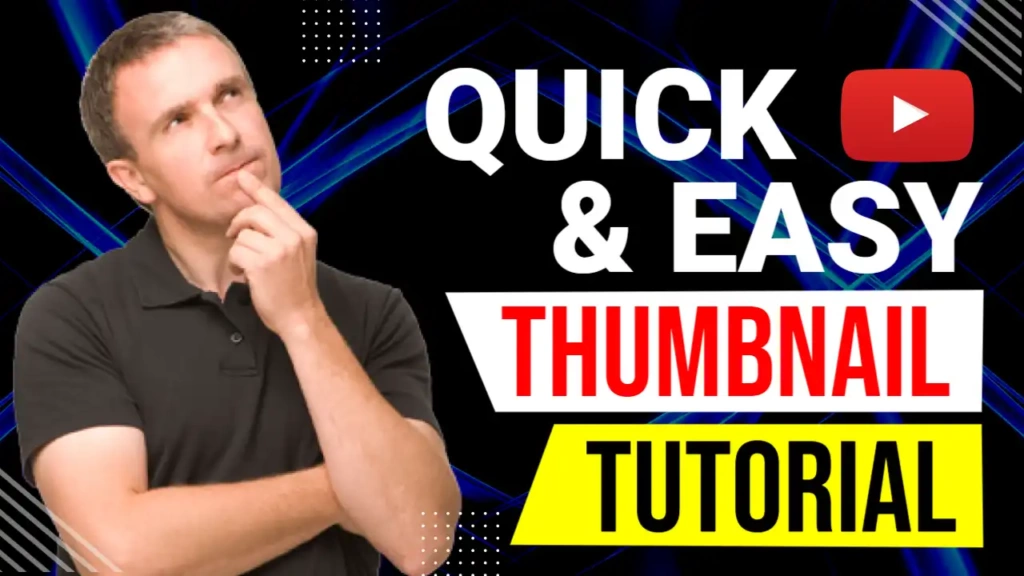
Why “Easy Tutorial” Thumbnails Get More Clicks
People on YouTube are always searching for:
- Easy tech tutorials
- Beginner-friendly guides
- Step-by-step lessons
- Quick solutions to problems
- Simple explanations
When viewers see the words “Easy Tutorial” on a thumbnail, it reduces fear and confusion. It tells them the video is simple, clear, and worth their time. This psychological trigger significantly increases click-through rate (CTR).
Features of the Easy Tutorial Thumbnail Template
The Easy Tutorial template is built specifically for tech and educational content.
🟡🔴⚪ Bright Attention-Grabbing Colors
- Yellow grabs attention and signals simplicity
- Red highlights importance and urgency
- White keeps the design clean and readable
This combination ensures the thumbnail stands out even among crowded YouTube search results.
💻 Tech-Style Fonts
The tech font used in this template:
- Looks modern and professional
- Is easy to read on mobile devices
- Matches software, app, and tutorial content
Clear fonts are essential for tutorial videos, and this template delivers exactly that.
📐 YouTube-Optimized Layout
The layout is designed to:
- Highlight the tutorial message clearly
- Avoid clutter and distractions
- Work perfectly on desktop and mobile
- Keep focus on the main text
Who Should Use This Easy Tutorial Thumbnail?
This thumbnail is ideal for:
- 👨💻 Tech tutorial YouTubers
- 📱 App and software educators
- 🎥 Video editing tutorial creators
- 🧠 Beginner learning channels
- 💡 How-to and guide videos
- 📚 Online teachers and trainers
If your content focuses on explaining things simply, this thumbnail is made for you.
Free Online Editing with ThumbzStudio
ThumbzStudio makes thumbnail creation fast and beginner-friendly. You don’t need any design skills.
With the free online editor, you can:
- Change the text instantly
- Modify font size and colors
- Add your own photo or screenshot
- Upload logos or icons
- Move elements freely
- Preview your thumbnail in real time
Everything works directly in your browser.
👉 Start Editing the Easy Tutorial Thumbnail:
https://www.thumbzstudio.com/template/ab0fb0b6-79c9-42b4-aad7-e090d7181f74
How to Edit and Download the Thumbnail
Creating your thumbnail takes only a few steps:
- Open the Easy Tutorial template link
- Click on the text and customize it
- Adjust colors if needed
- Add your own image or background
- Resize and reposition elements
- Preview the final design
- Download in high resolution
Your thumbnail will be ready for YouTube upload in minutes.
Why Free YouTube Thumbnail Templates Matter
Many creators struggle because:
- Professional designers are expensive
- Design software is complicated
- Time is limited
ThumbzStudio solves all these problems by offering:
- Free YouTube thumbnail templates
- High-quality professional designs
- Online editing without downloads
- Fast and easy customization
- Templates for every niche
This allows creators to focus more on content creation and less on design.
Best Video Topics for This Thumbnail
The Easy Tutorial thumbnail works perfectly for videos like:
- “Easy Tutorial for Beginners”
- “Easy Tutorial to Learn This App”
- “Easy Tech Tutorial Step by Step”
- “Easy Tutorial for Editing Videos”
- “Easy Tutorial for YouTube Growth”
The message is clear and instantly attracts learners.
Boost Your Channel Growth with Better Thumbnails
A good thumbnail can:
- Increase clicks
- Improve watch time
- Build viewer trust
- Improve YouTube algorithm performance
Using a clean, bright, and simple tutorial thumbnail helps your content stand out and appear more reliable.