
Why Your Gaming Channel Needs a High-Quality Thumbnail
The gaming niche is one of the biggest categories on YouTube, with millions of new videos uploaded daily. Viewers decide what to watch in just a few seconds, and your thumbnail plays the biggest role in attracting them.
A professional gaming thumbnail helps you:
- Increase CTR (Click-Through Rate)
- Establish a consistent brand identity
- Stand out from similar creators
- Attract new subscribers
- Make your content look premium and trustworthy
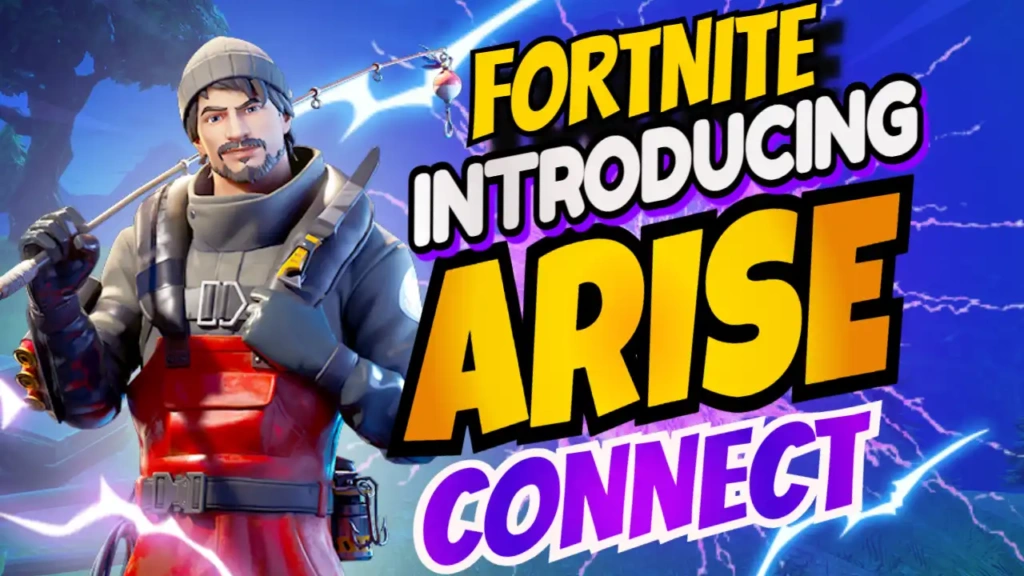
The Arise Connect template is crafted specifically for these goals. It delivers a strong gaming vibe using dynamic colors, bold shapes, and high-impact fonts.
Overview of the Arise Connect Thumbnail Template
The Arise Connect design uses a visually striking color palette of:
🎨 Color Combination
- Blue – Modern, cool, futuristic gaming feel
- White – Clean contrast and high readability
- Yellow – Highlights important text elements and adds energy
This combination is widely used by top gaming creators because it stands out even on small mobile screens.
🔤 Gaming Fonts
The template includes sharp, bold gaming-style fonts to deliver the iconic esports look. These fonts instantly communicate that your content is related to gaming, tech, streaming, or competitive gameplay.
🎮 Perfect for Gaming Channels
The entire layout fits gaming videos such as:
- Gameplay walkthroughs
- Game updates & patch notes
- Tutorials & tips
- Competitive esports clips
- Reaction and commentary videos
- Live stream announcements
The design focuses on clarity, excitement, and visual rhythm—key ingredients for an effective gaming thumbnail.
Features of the Arise Connect YouTube Thumbnail Template
Here are the standout features that make this template ideal for gaming creators:
⭐ 1. High-Quality Professional Design
Built by graphic design experts, the layout is clean, sharp, and perfectly balanced. You don’t need professional editing skills to make your thumbnail look premium.
⭐ 2. Fully Editable Online
You can edit the entire template directly on ThumbzStudio:
- Replace images
- Change text
- Adjust colors
- Add your own branding
- Insert gameplay screenshots
No Photoshop required—everything is beginner-friendly.
⭐ 3. Optimized for YouTube
The template is pre-sized for YouTube (1280×720), ensuring your thumbnail appears crisp on all devices.
⭐ 4. Eye-Catching Color Scheme
The mix of blue, yellow, and white creates contrast that increases visibility on both light and dark YouTube backgrounds.
⭐ 5. Gaming-Focused Typography
The futuristic gaming fonts add a professional esports identity to your channel.
Why the Arise Connect Template Is Perfect for Gaming Creators
Gaming content is all about visuals, speed, and energy. The Arise Connect template captures this perfectly with:
🎯 Bold Headline Area
The space for your main title makes your message easy to read even at a glance. Whether it’s “Gameplay Highlights,” “New Update,” or “Live Now,” the design makes your content instantly recognizable.
🎯 Character or Gameplay Focus
There’s enough room to insert your face, game characters, or a screenshot to make your thumbnail more clickable.
🎯 Strong Color Vibes
The modern gaming vibe created by the blue and yellow palette helps your content look current and trendy.
🎯 Professional Layout
The composition guides the viewer’s eyes to the main information, helping increase clicks naturally.
How to Edit the Arise Connect Template on ThumbzStudio
ThumbzStudio’s online editor allows you to create a gaming thumbnail in minutes. Here’s how:
✔ Step 1: Open the Template
Click the link:
https://www.thumbzstudio.com/template/c37ce98a-2378-4d79-971d-10ccbd935317
✔ Step 2: Click “Edit Template”
This opens the design in the browser-based editor.
✔ Step 3: Customize the Text
Replace the sample text with your title or keyword.
Examples:
- Arise Connect Gameplay
- New Update Review
- Epic Battle Highlights
✔ Step 4: Add Your Image
Upload your gameplay screenshot, logo, or face cam image.
✔ Step 5: Adjust Colors and Icons
You can keep the default blue, yellow, white palette or personalize it.
✔ Step 6: Download Your Thumbnail
Once done, click Download, and your HD thumbnail is ready to upload to YouTube.
No editing experience required—any beginner can create a professional gaming thumbnail with this tool.
Benefits of Using ThumbzStudio Gaming Templates
ThumbzStudio is trusted by YouTubers because it offers:
- Dozens of free gaming templates
- Easy drag-and-drop editing
- High-quality fonts and graphics
- Fast exporting
- No watermark on downloaded designs
- Simple customization for beginners
If you want to build a strong gaming brand, using ready-made templates saves you hours of editing and ensures your thumbnails look top-tier.
SEO Tips for Gaming Thumbnails
While thumbnails attract clicks, your titles and metadata also matter. Here are quick tips:
- Use short, bold titles
- Include gaming keywords
- Keep text minimal
- Use high-contrast colors
- Add an expressive character or face
The Arise Connect template already follows most of these best practices, giving you a strong advantage.
Free Download or Edit Online
You can edit this template for free or download the finished thumbnail directly from ThumbzStudio.
👉 Click here to edit or download:
https://www.thumbzstudio.com/template/c37ce98a-2378-4d79-971d-10ccbd935317
Create stunning, professional gaming thumbnails in minutes—no design experience needed!
Final Thoughts
The Arise Connect YouTube Thumbnail Template is a must-have for gaming creators who want to grow their channel faster. With its blue, yellow, and white color theme, premium gaming fonts, and dynamic layout, this template helps your videos stand out, attracts viewer attention, and enhances your brand identity.
If you want to level up your YouTube presence, boost your click-through rates, and create thumbnails that look professional and engaging, this template is the perfect solution.
Start designing your gaming thumbnails today with ThumbzStudio—easy, fast, and completely beginner-friendly.