
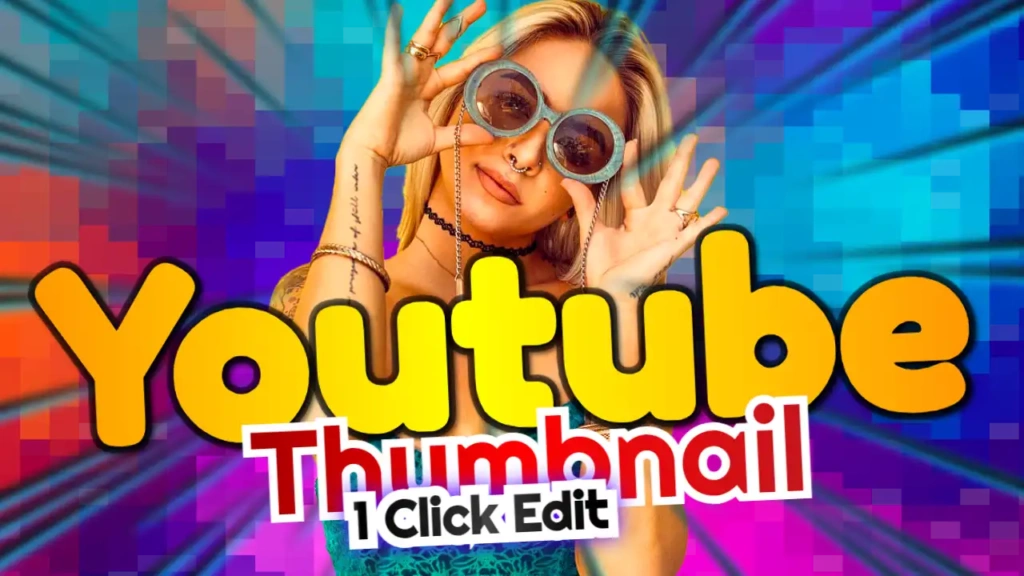
Why This Thumbnail Template Stands Out
The phrase “Colourful One Click Edit” is powerful because it highlights both creativity and convenience. It appeals to creators who want fast results without compromising on quality.
Key Features:
- Bright and vibrant color scheme
- Easy one-click editing functionality
- Clean marketing-style font
- High visibility on all devices
- Perfect for multiple content niches
This template is ideal for:
- Digital marketing videos
- YouTube growth tutorials
- Content creation tips
- Online business guides
- Social media strategy content
The Power of Colorful Thumbnails
Color is one of the most important elements in thumbnail design. Bright colors naturally attract the human eye and make your content stand out in a crowded feed.
🎨 Yellow – Energy & Attention
Yellow is one of the most eye-catching colors. It instantly grabs attention and creates a sense of excitement.
🔵 Blue – Trust & Reliability
Blue balances the design by adding a professional and trustworthy feel.
🔴 Red – Urgency & Action
Red creates urgency and encourages viewers to click on your video.
Together, these colors create a visually striking thumbnail that increases engagement and clicks.
Design Breakdown
Let’s take a closer look at what makes this template effective:
🎯 Bold Headline Text
The text “Colourful One Click Edit” is large, clear, and easy to read, even on smaller screens.
🎯 Clean Layout
The design avoids clutter, ensuring that your message is delivered instantly.
🎯 Marketing-Focused Style
The font and layout are optimized for creators who focus on business and marketing content.
🎯 High Contrast
The combination of bright colors and dark elements ensures maximum visibility.
How to Customize This Template
One of the biggest advantages of this template is how easy it is to edit. Follow these steps:
Step 1: Open the Template
Click the link above to access your design.
Step 2: Edit the Text
You can customize the headline based on your content. Examples:
- “One Click Thumbnail Edit”
- “Edit Thumbnails Instantly”
- “Fast & Easy Thumbnail Design”
Step 3: Add Your Visuals
Include your own images, icons, or branding elements to personalize the design.
Step 4: Adjust Colors
Modify the yellow, blue, and red tones to match your brand identity.
Step 5: Download
Export your thumbnail in high resolution and upload it to YouTube.
Content Ideas for This Template
To maximize the impact of this template, here are some video ideas:
- “How to Edit Thumbnails in One Click”
- “Best Tools for YouTube Thumbnail Design”
- “Create Stunning Thumbnails Fast”
- “YouTube Growth Tips for Beginners”
- “How to Design Thumbnails Without Experience”
These topics align perfectly with the message of speed and simplicity.
Tips to Increase Click-Through Rate (CTR)
Even with a great template, these strategies can boost your results:
✔ Keep Text Short and Bold
Use clear and concise text that is easy to read.
✔ Focus on One Message
Avoid adding too many elements—simplicity is key.
✔ Use Bright Colors
Vibrant colors help your thumbnail stand out.
✔ Add Emotion
Faces and expressions can increase engagement.
✔ Stay Consistent
Use a consistent style across your thumbnails to build brand recognition.
Who Should Use This Template?
This template is perfect for:
- Digital marketers
- YouTube content creators
- Social media influencers
- Online entrepreneurs
- Beginners learning thumbnail design
Whether you’re teaching or creating, this template will help you produce professional thumbnails quickly.
Why Choose ThumbzStudio?
ThumbzStudio is designed to make thumbnail creation simple and efficient. With ready-to-use templates, you can:
- Save time on design
- Create high-quality thumbnails instantly
- Customize everything بسهولة
- Improve your video performance
Best of all, these templates are completely free to use.